
Choose Your Theme
Warren Shea

Archive for the ‘All Posts’ Category

My Saturday is average.

Saturday, September 18th, 2010 at 8:53 pm

I slept last night at around 11pm….It was weird, I came home from a bar and left, my skin very warm and with a headache. Except this time I didn’t drink. -_-; It’s unexplainable! Maybe it’s the bar atmosphere O_O

So last night, I thought it’d be funny if I took some mutual funds papers to bed and fall asleep while reading them. So that when Z found me, she’d think it were funny that I couldn’t stay awake reading it. For some reason, I thought this would be funny…I don’t know why. I was drunk (actually, no I wasn’t…). Anyways, I fell asleep, as planned…and then kept sleeping…until 2pm today. Let me tell you, it was an awesome sleep :D I had at least 4 separate dreams…one was a Futurama episode o_o.

Went out to some dim sum restaurant that Z wanted to go to…had some very good eats. Then walked around Eaton Centre a bit. I got a $30 tripod at Best Buy for a camera that I’m currently borrowing. The lack of a steady hand and a good camera & macro lens go together pretty poorly.

EDIT: Here’s a pic of my new “studio”. Looks good with a tripod…also, taking pictures on the couch didn’t seem to work….too low…my back couldn’t take it.
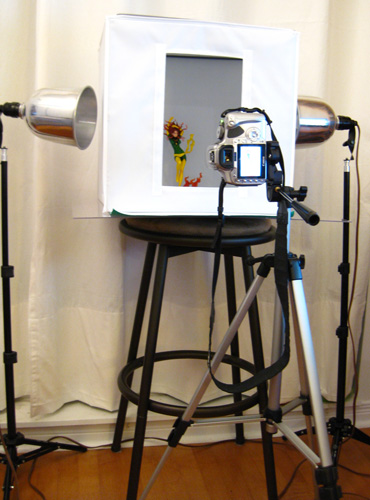
Photo Studio

EDIT: I also got some Mario mints at Best Buy:
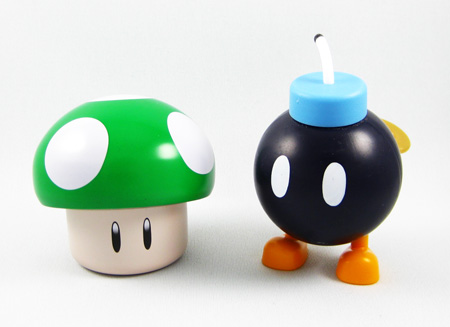
Mario Mints

I went to the Disney Store and pre-ordered a Blu Ray Beauty and the Beast. Got this pretty lithograph for pre-ordering.
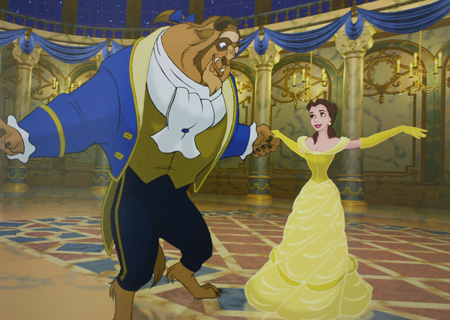
Beauty and the Beast Litho
note: this is a picture of MY lithograph, not a picture off the internet…

We also got 2 stuffed animals, a Hamm and a Doug. Zena and I really liked the Hamm (he was very soft!) and the Doug might prove useful later.


Hamm

Doug

The plan is to get some Disney Blu Rays, Beauty and the Beast, Aladdins, The Lion King, etc. Toy Story 3 Blu Ray available from pre-order in early Oct FYI. I personally cannot wait for the Toy Story Blu ray box set trilogy. I was in line at the Disney store, running through Toy Story 3 in my head, especially the ending, and finding myself zoning out into the emotional aspect of it. Hard to describe. Toy Story 3 really was one of the best movies I’ve seen all year, if not the best. I can’t wait to rewatch an HQ version of it.

Zena also purchased Starcraft II for herself. I pray that I don’t start it…

After that, I went to Indigo to look for some CSS books. As I started looking at the selection of books, I felt a big overwhelmed at the number of different books and different topics. HTML5 books, ASP.NET C# 4.0 books…jQuery. I felt uneasy and wanted to go home…to do work. But then I started blogging… :S

You know, I just realized that when I opened and removed the tripod from the box, I completely discarded the instructions. When I buy a Transformer, I’d never look at the instructions on how to transform it. “Instructions are for little girls” I would say. Except I don’t use “little girls”, I say something slightly more vulgar. But aren’t simple instructions the basis of learning fundamentals? Maybe I’m not the type that can instinctively learns from fundamentals, I’m the type and dives in head first and then drowns? or more accurately, dives in head first, learns how to swim enough to get by, but probably not make any records.

I leave you with a Flash plushie I got a couple of months ago. He sports a jagged lightning belt meaning he’s Barry Allen, not Wally West (boourns). He’s still cute though.

The Flash

What’s next (for me in web development)?

Thursday, September 16th, 2010 at 5:54 pm

So, the last few days I’ve learned a couple of things
1. My fundamentals suck. I don’t read any books, other than the ASP.NET one that I’m “currently” reading. I never read any html, asp, css, javascript book or anything. Everything I’ve done, everything I’ve learned my entire web career has been self taught or looked up, ie: I look up what I want to do, do it, and learn that “method” and use it elsewhere. For example, if I wanted something to loop, I would look it up.
Learn about for, while, do while. Make my change that needs the loop. And down the road, apply my knowledge to something else.

What this means is
a) I’m strong because I’ve looked a lot of things up.
b) I’m strong because I’m good at thinking outside the box…because I’m able to apply what I know creatively to get something accomplished. And if I can’t think of a solution like that, I look it up and add to my knowledge base.
c) I’m weak at fundamentals. I don’t know the “right way” (by that, I mean, the shortest, most efficient way) to do things because I find creative workarounds to accomplish the same thing. Like when I built a calendar from scratch. A feat in itself but time wasted when I could have used a control or other source code available.
For example: I didn’t know what display: block did. I thought it was just the opposite of display: none. I thought everything was inherently display: block’ed unless you specified display: none, which would hide it. I never learned what display: block was, I just guessed it’s functionality based on some use and the difference between that and display: none.

Conclusion: I will begin my re-education and buy/read some books on: CSS2.
I will learn CSS3 and HTML5 from a book so I get my fundamentals down. From there, I’ll continue learning what/how I currently learn….which brings me to my next point.

2. I’ve often wondered if I should move away from front-end web development and move to back-end. I’m good at both, stronger on front-end (that’s my job). But front-end does get kind boring in the way of “deep” thinking, something I really love. I thought I’d learned enough about front-end to try something more complicated…but because of 1 (above), I realize I’m not as strong as I thought, maybe there’s still room to stay in the front-end side. The thing is, with CSS3 and HTML5, where HTML5 is fundamentally different from HTML 4.01 and XHTML 1.1, there’s still a lot to learn. I imagine HTML5 will bridge the front-end and back-end development sides…but since I don’t know too much about HTML5, I can’t confirm that statement.

Conclusion: I will continue what I’m doing, both front-end and back-end. I will try to learn CSS3 and HTML5 early and decide whether or not it’s enough to satisfy my “deep” thinking. I will start working on something more complicated to fulfill my back-end need…which brings me to my next point.

3. I’m getting bored with warrenshea.com. Not in terms of blogging, but in terms of updating the site, creating themes, in terms of content/difficulty. I’ve launched 2 themes in the last week, I probably should have staggered myself, but there isn’t/wasn’t any challenge in doing my gmail theme. The idea was fun, the design was okay (like always), but the development was tedious. There are 4 themes I want to do still but currently have no motivation to do any of them. They all include a little “quirk” which would make the development interesting…but not interesting enough.

Conclusion: I think I’ll take a break from warrenshea.com for a bit (again, not the blogging aspect). I’m going to spend more nights re-re-re-re-catching up with ASP.NET….and planning the “EPIC SITE” site I want to build.

I know I write that ever 2 months but THIS TIME I MEAN IT :@

GMAIL theme launched

Wednesday, September 15th, 2010 at 2:52 am

Rushed a theme…didn’t completely test everything….but it’s available

http://www.warrenshea.com/gmail/

idea: today
design: today
development: today
launch: today

I wanted to do a GMAIL theme and yesterday at work, we were looking at this website: http://whichloadsfaster.com/. I tested my site against other sites and, not surprisingly, it got killed.
There’s tons of JavaScript, tons of php logic, tons of images on other themes. That’s the price you pay for coding that can take care of everything….it’s not done cleanly.

So I did this theme…which has a total of 10 images to it, 6 of them being those little icons on the right. The other 4, the title, the icon, and 2 background images of 1 color. It was my intention to create a faster loading theme to counter the slow, image intensive Naruto one released a few days ago. Pretty kool how this whole theme and all the work put into it only took 1 day :) I think I’m most proud of that. And I’m least proud of quality control, having not tested IE8 and Safari, despite being a few clicks away. I’ll leave that for tomorrow…no one’s gonna look at the site in the meantime…except maybe YOU.

EDIT: i wonder how long i can leave this on my screen at work w/o arousing suspicion that it’s my personal site. let me tell you, you can spot that i’m not doing work when it’s on my mega man theme in like, 5 seconds.

…not that gmail is work but at least it’s more acceptable than my favorite 8-bit blue bomber :D

DC Universe Online adware destroys my PC

Tuesday, September 14th, 2010 at 12:28 am

This post was original written last Tuesday (Sept 7, 2010).

So, a couple of days ago, I try to sign up for the BETA for the DC Universe Online MMORPG (I swore never to play another MMO…but I’m too tempted with the superpowers of flight and superspeed…I don’t plan to play it much, just want to experience their powers a little).

There’s a PS3 and PC opt-in, on their official site. I did both. For the PC version, you have to create some Sony account….when I enter in my custom username, I’m hit with an AVG (Free + Awesome Anti Virus software) alert saying some of my files have been infected.

W. T. F.

Anyways, I purge the error and continue with the registration (inputting an on-the-spot random password and one of my spam email accounts)…looks successful (and I think/hope it is).

I do a random restart a couple days later and there’s an error: It can’t find one of the virus-infected files. I’m thinking “good, because I purged it”…but as I find out, there’s still some traces of it in the registry as well as my system32 (which is why the error occurred – the registry was looking for the infected file to start). I stop/kill process run32.dll or whatever…and delete a reincarnating registry entry upon booting my Win7 in safe mode.

Everything looks clean, my registry, my msconfig startup, it looks all good.

This morning, I’m greeted with an error saying files are infected. I remove the files and it crashes my computer (AVG gives you a warning that removing infected, system files causing instability and possibly crash…so I’m not scared). I boot my computer and it can’t find the boot drive. Now I’m scared.

I restart and luckily, I’m able to boot in Safe Mode. I do so and copy my “Users”, “Program Files”, and “Program Data” folders to my external drive…I’m going to have to (and I don’t mind) doing a reinstall. But it sucks cuz I was planning to work from home tonight but it looks like I’ll have to stay in the office to get my stuff done. Boourns. So, because my Win7 is currently in safe mode, I couldn’t check the internet/weather like I usually do in the morning. I walk to work and get rained on. That must be the God that I don’t believe in, pouring salt on my wound. Jerkface.

So my plan is to do a Reinstall of Windows 7…possibly start tonight or whatever.

It’s funny, I’ve probably gone through at least 60 reformats/windows installs throughout my years. When I was younger, I would install Windows 95 and Windows 98 upgrade…and if you connected to the internet, w/o Anti Virus software, you’d get like, viruses….just streaming into your comp. At least that’s how I remember it…so I’d say about 50 of the reformat/reinstalls were 95/98….once I moved to 2000 and XP, it became less of an issue. It was still an issue…because in my process of learning about computers, I’d often change this, download that, try doing other stuff….and it’d often have dire consequences, always resulting in a reformat/reinstall. I’m pretty good now, it rarely happens…I’m also prepared. Like Batman. All my files on are on other partitions/external drives and I do a full backup to DVD(s) every couple years. I have a list for what I need to do in my GMAIL drafts folder. Granted, it needs updating:

Back up
Fonts (c:\windows\fonts\)
Files and Folders (All Users, Program Files, Program Data)
Bookmarks

Restoration
Install Windows
Defrag
Install AVG – Anti Virus software
Install WoW (not in C Drive)
Defrag
Install Steam and Install Counter Strike Source/Plants VS Zombies
Install Warcraft 3
Defrag
Install Adobe stuff
Get updated Flash Player
Firefox
Chrome
Nero
ATI Drivers
Ultramon (Dual Monitor tool)
Vent Client /Server – for WoW
WinRar
iTunes
utorrent
Codecs (CCCP)
Logitech G11 and SetPoint – custom keyboard/mouse settings for WoW
.NET Framework
SQL Management Studio Express
Set up PC/PS3 Media Server

Restore necessary files from
Users, Program Files, Program Data including
My Documents folders
WoW Screenshots (saved into c:\program files\world of warcraft\screenshots\
FTP information stored within Dreamweaver and FireFTP (Firefox)

Delete backup copies of Users, Program Files, Program Data

EDIT: Thursday (Sept 9, 2010).
I did my reinstall last night. Formatting and reinstalling Windows is so much faster and less painless than before. The time consuming part is installing all the programs, etc…I think I’m pretty much up to speed.

EDIT: Monday (Sept 13, 2010).
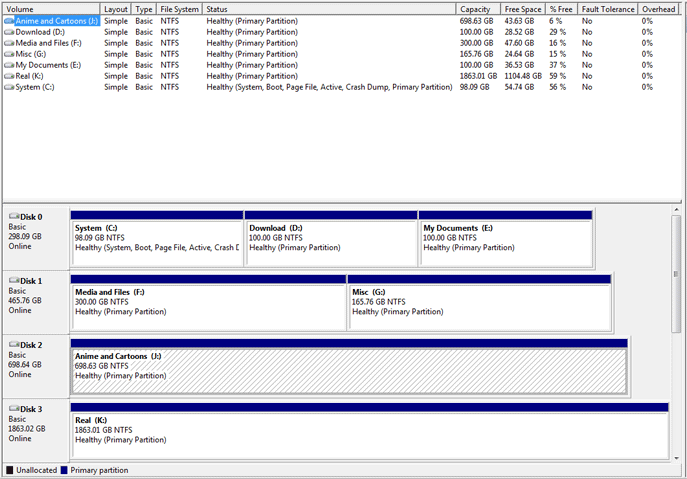
My computer’s back up to speed…well, it’s been up to speed for a while. I just installed Visual Studio 2010 that I got from the UWaterloo MSDN. With that installation, my 60GB System Partition was almost filled up. Yesterday, I did some partitioning…merging, deleting, etc. I couldn’t increase the size of the system partition because other partitions had gotten in the way so what I did was move all my files from the other 2 partitions to my 2TB external, and then did a format/partition deletion. From that point on, I repartitioned the drive back to 3 with revised numbers.


Click for larger image

It’s pretty awesome how Windows 7 can partition…no need for Partition Magic. It can’t merge or anything but with my solution, copying files to my external/copying it back, partition merging can be accomplished through other means.

OCD
If you see my partition’d drives, you’ll notice a lot of them are “perfect numbers”. If I can, I try to have the numbers come up to nice numbers, 100.00 GB, 300.00 GB, 50.00 GB. You have to convert them from MB so if I want 100GB, it’s 100×1024 = 102400 MB…I figure out those numbers and dump the rest of the space into another partition. Something about having the number just so. I like things in simple numbers if I can help it.

/my computer is organized so well right now! :D that makes me sleep better at night. it really does.

It started with a kunai….

Sunday, September 12th, 2010 at 2:50 am

Naruto theme launched! (it’s ironic that if you’re on the Naruto theme, you can’t click this link…more on that later)

I’ve launched a new theme (finally). It took about 3-4 days/nights of work and about 6 months of procrastination. Now THAT’S being proactive :D

Let’s see…how did this theme come about?
I knew when I developed the website, which launched April 4, that Naruto would be my third theme. I’ve had this idea in my head for a whole half a year but had been busy with other stuff that I couldn’t get to designing/developing this theme until recently. I’d started to see the usefulness of PNGs and I wanted to work with that. I had a desk theme in my head with a kunai stabbing it; its shadow cast over the content. That’s how the idea started…

Awesomeness of this theme:
1) The scroll (which I gotta say I LOVE). I absolutely LOVE the effect it has when you scroll up and down on the page. It’s not apparent on a long page like the homepage/blog but if you go to any other page and scroll to the end, you see it’s interestingness.
2) The photos/shuriken (ninja stars). Basically, I had to figure out WHERE this desk was…originally I didn’t want to show any Naruto characters on the site, I didn’t want one of those “image of person on the screen for no reason other than design” themes. But the photos work itself out so that you can still see characters, without being taken out of the scene. Originally, I had the idea to just have the kunai as a prominent, constant image, as well as some shuriken. Giving it some more thought, I decided to randomly organize the desktop. It literally changes on every screen/refresh. 3 possible combinations/rotating items, around 12 or so different images for each (w/o repeating 2 on the same page). What’s the math for that? 12x11x10 (trying to figure out how to write that in permutations/combinations…but it’s been a long time) 12!/9! ?? <insert cry for help>

Problems with the theme:
1) Glaring problem which I’m well aware of: The kunai.png is on the “top layer”, over the content. What this means is that if you click on a link in the content, there’s a chance you could be clicking on the kunai.png which basically renders the click ineffective. NO WAY AROUND THIS given the effect I want. To be honest, I don’t care. This theme is done for the visual aspect, not the usability.
2) The width of the content is really tiny. I’ve been resizing all my images for a 450 width…that would be my smallest content size. Unfortunately, not all my content fits that, despite trying…sometimes it goes out of the scroll.
3) There’s less content on the right than there used to be for the Naruto theme. The reason is that I didn’t want that content to scroll, on a desk, it didn’t make sense so I cut out a lot of the content but made it static on the page.
4) On a smaller resolution, like 1200×800, the scroll height at the top is far too large. Minimizing the height requires a LOT of work….and not something I’m interested in doing right now. So my apologies on that, I had done the scroll before testing a resolution of that height and well, it was too late to change! >_< Things I've learned: 1) You can do so much (more) with PNGs compared to everything else. Well, I'm still an old school animated gif maker...but I LOVE PNGs. It's like a Photoshop layer...on the web. 2) My site, even 6 months ago, was coded VERY WELL. The framework for CSS possibilities was totally done well, the need for editing the actual code on this page was minor. CSS DOES IT ALL. The difference between my megaman, blogger and naruto themes: all CSS/JavaScript. I'm a bit embarrassed to say that I used quite a bit of JavaScript on this page http://www.warrenshea.com/common/naruto/scripts.js
(At least I commented it :D I -almost never- do that!)
Originally, much of the image placement relied on the size of the user screen, something I need to determine with JavaScript. That actually changed today….so hmmm, maybe I can eliminate some JavaScript. I’ll give that some thought, the load time of this page is a bit much….

One note: I’m an awesome cross browser developer !
I had been developing this site in Chrome and Firefox…and actually launched it without testing IE8 or Safari…but once I launched it, I tested those 2 (had to download Safari -_-;). The page works flawlessly on:
FireFox 3.6.9
Google Chrome 6.0.472.55
Safari 5.0.2
Internet Explorer 8.0

Naruto Part 1:
Oh yeah….I chose Naruto Part 1 (pre-time jump) over Part 2 because…well, frankly I like Part 1 better. The characters are developed, interesting, everything is new and the ideas they introduce are awesome. Almost a decade later and Naruto’s got some nice fights, some interesting backstories…but overall I don’t have the same excitement from it that I did when Part 1 was going on. I’m excited to see new manga but not as excited as I see the fans of One Piece, which I believe has gone on longer than Naruto. I gotta start that, everyone just raves about it….Bleach also is kinda meh for me lately too…despite it looking like it’ll be over in the next few weeks/months. We’re at the final battle but it’s still meh.

Anyways, that’s it for now, take a look at the theme and provide feedback.